 Firebrat

One camera, four views
On the device
False-colour heat map on the 320×170 LCD with max, center and min, a colour scale and a crosshair.
Browser, over WiFi
The camera serves its own web app from flash. Phones and laptops on your network watch at once, in sync.
Browser, over USB
Plug it into a computer and open the live camera page. No WiFi needed, 16 fps.
Browser, over Bluetooth
Same page, wireless, no network: connect over Bluetooth from Chrome or Edge, up to about 15 fps.
Clean images
Chess-pattern fix, motion-aware temporal filter and median, tunable live with sliders.
Snapshots and recordings
PNG, CSV, video and raw-data recordings in the browser, or firebrat.py snap / record from a computer.
Interpolation
32×24 measurements, scaled up three ways. The picture changes; the readouts and CSV use the 32×24 values.
Palettes
What you need
| Part | Notes |
|---|---|
| LilyGO T-Display-S3 | ESP32-S3 with a 1.9" 170×320 LCD, 16 MB flash, 8 MB PSRAM. Or any ESP32-S3 for a screenless build. |
| MLX90640 breakout | 3.3 V I2C. 55° (BAA) for general use, 110° (BAB) for wide scenes. |
| JST-SH 4-pin cable | Qwiic / STEMMA QT style, or four jumper wires: 3V3, GND, SDA, SCL. |
| USB-C cable | Power, flashing, the console and the USB view. |
Plug the sensor into either 4-pin connector; the firmware probes 18/17, 43/44 and, on generic boards, 8/9.
Build and flash
- Install PlatformIO and clone:
git clone https://github.com/deftio/firebrat && cd firebrat - Flash the build for your board:
pio run -e t-display-s3 -t upload # T-Display-S3 with its screen pio run -e t-display-s3-headless -t upload # same board, no screen pio run -e esp32s3-headless -t upload # any ESP32-S3 - Join WiFi with the Bluetooth setup page, or at the console:
pio device monitor wifi "My Network" "my password" - Open the address on its screen, or
http://firebrat.local/.
How it works
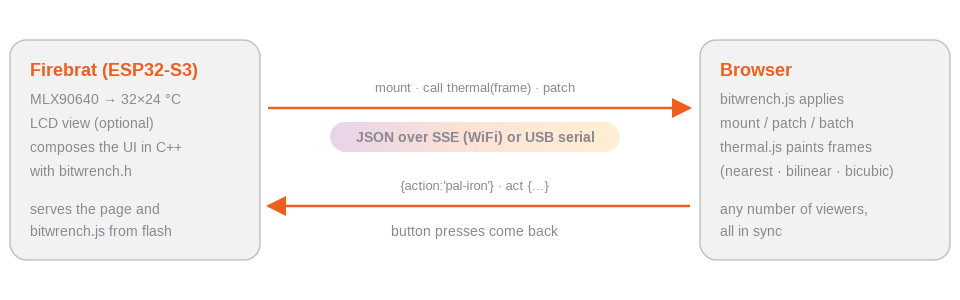
The camera never sends HTML. Its UI is built with bitwrench.js: on connect the firmware mounts the whole interface in one JSON message composed in C++, then every frame is one more message, a call that hands the 32×24 temperatures to the page's painter plus patches for the readouts. The same messages travel over WiFi (Server-Sent Events), USB (Web Serial) or Bluetooth. How it works explains every connection, setup and the protocol in depth.
{v:1, type:'batch', ops:[
  {v:1, type:'call',  name:'thermal', args:[{w:32, h:24, pal:'iron', interp:'bicubic', lo:22.1, hi:30.3, px:'…'}]},
  {v:1, type:'patch', ref:'fb-max', text:'30.3'}
]}
The console is xelp, on USB and over Bluetooth (Nordic UART) at once.
Questions
Do I need the screen?
No. The LilyGO T-Display-S3 build drives its LCD, but the same firmware also builds without it (t-display-s3-headless), and for any ESP32-S3 board (esp32s3-headless). Without a screen you watch in a browser over WiFi, USB or Bluetooth.
Which sensor does it use?
The Melexis MLX90640: a 32×24 thermopile array (768 pixels) on I2C at address 0x33, with a 55° or 110° field of view depending on the variant. Breakouts from Adafruit, Pimoroni, SparkFun and others all work.
How fast is it?
Up to 16 complete frames per second on the screen, over WiFi and over USB; up to about 15 over Bluetooth. The display only updates once both halves of a frame have been read, so there is never a half-old image. 8 fps is a little cleaner, because the sensor averages longer.
How is the noise handled?
Three filters, each switchable live: a chess-pattern fix (the sensor reads alternate pixels in two halves), a motion-aware temporal filter that averages still areas and shows movement at once, and a small median filter. At 16 fps they cut speckle from about 0.9 °C to 0.16 °C.
What are nearest, bilinear and bicubic?
Ways of scaling the 32×24 image up for display. Nearest shows the real pixels as blocks, bilinear blends neighbours, and bicubic (Catmull-Rom, the default) is the smoothest with crisper edges. Readouts and CSV use the 32×24 values.
Which browsers work?
The camera's own web page works in any modern browser. The live camera page here needs Web Serial (USB) or Web Bluetooth, and the WiFi setup page needs Web Bluetooth: Chrome or Edge on desktop, Chrome on Android. On iOS, the Bluefy browser supports Web Bluetooth.
Why can this site not reach the camera over WiFi?
This site is served over HTTPS and the camera serves plain HTTP on your own network, and browsers block that mix. Open the camera's own address (on its screen, or http://firebrat.local/) for the WiFi view, or use USB or Bluetooth here.
Is it a calibrated instrument?
No. It reports the MLX90640's object temperatures assuming an emissivity of 0.95, close for skin, wood, paint and most non-metals but wrong for shiny metal. Treat it as a good qualitative thermal camera.