Write markdown. Render everything.
A native desktop editor powered by quikdown with rich rendering for Mermaid, LaTeX, GeoJSON, CSV, Vega charts, and more — plus a built-in AI assistant that reads and edits your document.
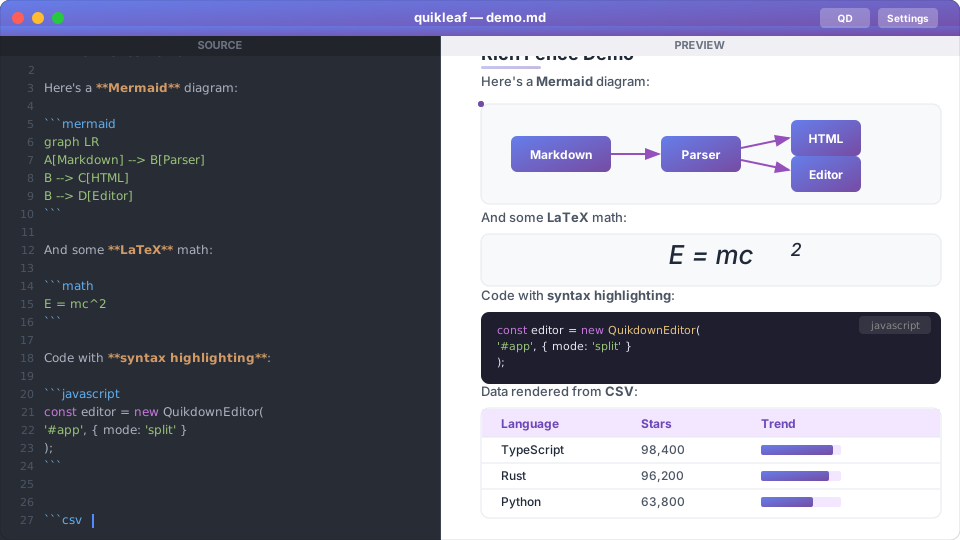
Live editing with Mermaid diagrams, LaTeX equations, syntax-highlighted code, and tabular data — all rendered locally.
Up and running in one command
Install globally via npm, or run directly with npx.
npm install -g quikleaf
npx quikleaf document.md
Open empty editor
quikleafOpen a file
quikleaf document.mdProject mode
quikleaf --project ./mydirDesktop installers
Native platform installers are on the way.
macOS (Apple Silicon)
.dmg installer
macOS (Intel)
.dmg installer
Windows
.msi / .exe installer
Linux
.deb / .AppImage
Everything you need in a markdown editor
Built for developers, writers, and anyone who works with markdown daily.
Rich Markdown Rendering
Powered by quikdown standalone with syntax highlighting, Mermaid diagrams, LaTeX math, GeoJSON maps, 3D STL viewer, CSV tables, Vega charts, ABC music notation, and SVG — all rendered locally.
LLM Chat Integration
Built-in AI assistant (QD) with streaming responses and 20+ tools for reading, writing, and editing your document. Supports OpenAI-compatible APIs and Anthropic Claude.
Project Mode
Open a folder to get a file tree sidebar, project-scoped file tools, persistent memory and key-value store, and automatic project state saving.
Local LLM Auto-Detect
Automatically finds Ollama and LM Studio running locally. No configuration needed — just start writing and chatting. Works fully offline.
Tool-Calling Loop
QD can read your document, make edits, manage a scratchpad, and work with project files — all through a structured tool-calling loop with a stop button.
Native Desktop App
Fast startup, low memory footprint, native file dialogs, keyboard shortcuts, auto dark mode, and resizable panels. Built with Tauri v2.
Every fence type, rendered locally
quikdown's standalone bundle includes all renderers. No external services, no network requests.
Code
Syntax highlighting via highlight.js for 180+ languages.
Mermaid
Flowcharts, sequence diagrams, Gantt charts, state diagrams, and more.
Math / LaTeX
Inline and display math via MathJax. Full LaTeX equation support.
GeoJSON Maps
Interactive Leaflet maps from GeoJSON. Points, polygons, and lines.
3D STL Viewer
Render STL 3D models with orbit controls. Powered by Three.js.
CSV / TSV / PSV
Tabular data rendered as clean HTML tables automatically.
Vega / Vega-Lite
Declarative charts and visualizations from JSON specs.
SVG & ABC Music
Inline SVG rendering and ABC music notation with sheet music output.
Works with any LLM provider
Connect to local models via Ollama or LM Studio, or use cloud APIs like Anthropic Claude and OpenRouter.
Ollama (Local)
Auto-detected on localhost:11434. Run ollama serve and quikleaf finds it automatically. Fully offline.
Anthropic Claude
Connect to Claude Sonnet, Opus, or Haiku. Enter your API key in Settings. Streaming responses with tool calling.
OpenRouter & More
Any OpenAI-compatible API works: OpenRouter, LM Studio, Groq, Together, or your own endpoint.
Keyboard shortcuts
| Shortcut | Action |
|---|---|
| Cmd/Ctrl + O | Open file |
| Cmd/Ctrl + S | Save file |
| Enter | Send chat message |
| Shift + Enter | New line in chat |
Chat slash commands
| Command | Description |
|---|---|
/help | Show available commands |
/clear | Clear chat history |
/model | Show current LLM model |
/memory | Show scratchpad contents |
/tools | List available tools |
For contributors
Requires Node.js 18+ and Rust 1.70+.
Development
# Install frontend dependencies
npm install

# Run in development mode (hot reload)
npm run tauri:dev

# TypeScript type checking
npm run check

# Rust compilation check
cd src-tauri && cargo check
Production Build
# Build production installers
npm run tauri:build

# Output locations:
#   macOS:   src-tauri/target/release/bundle/dmg/
#   Windows: src-tauri/target/release/bundle/nsis/
#   Linux:   src-tauri/target/release/bundle/deb/
macOS
xcode-select --installLinux (Debian/Ubuntu)
sudo apt install -y \
  libwebkit2gtk-4.1-dev \
  build-essential curl wget \
  libssl-dev librsvg2-dev
Windows
Visual Studio 2022 with "Desktop development with C++" workload.
How it's built
Tauri v2 backend in Rust, TypeScript frontend in a webview, quikdown for rendering.
src-tauri/                  Rust backend (Tauri v2)
  src/commands/
    fs.rs                   File I/O commands
    llm.rs                  LLM API proxy with streaming
    project.rs              Project state, memory, KV, file tools
  src/main.rs               CLI parsing, app setup

src/                        TypeScript frontend (Vite)
  editor/editor.ts          quikdown editor wrapper
  chat/chat-ui.ts           Chat UI, tool dispatch, slash commands
  chat/providers.ts         LLM provider adapters (OpenAI, Anthropic)
  settings/settings.ts      LLM config UI, auto-detect
  project/file-tree.ts      Project mode file tree sidebar
  main.ts                   App init, file ops, project mode

index.html                  App shell
Markdown Only
The LLM operates on raw markdown — it never sees or produces HTML. The user sees rendered preview via quikdown.
Backend Proxy
LLM API calls are proxied through the Rust backend to avoid CORS issues and keep API keys out of the webview.
Offline Rendering
quikdown's standalone bundle includes all fence renderers (~8 MB) for complete offline use. No CDN dependencies.